Impersonation Done Right: Tokens, Read-Only Guarantees, and Audit Trail

If you build enterprise SaaS with any kind of permissions model, you've heard this feature request before: "Our admins need to see what a user sees." The motivation is always the same — a user reports they can't access something, or they're seeing the wrong data, and the admin has no good way to verify what's going on from the user's perspective.
The workarounds your customers resort to are painful. They ask their users for screenshots, or schedule screen shares, but these are high-friction interactions. They try to reproduce the issue with test accounts, but test accounts never have the same permissions, the same data, or the same organizational context as the real user.
So sooner or later, the feature request lands on your backlog: let admins log into the app as another user — see the same dashboards, the same data, the same permissions. Even before users complain about missing access.
But the moment you say "admin impersonation" in an enterprise context, alarm bells go off. Can the admin modify the user's data? Can they access private information? Is there an audit trail? How do you prevent this from becoming a backdoor?
These are fair concerns. At Pigment, we built a user-facing impersonation mode that lets admins review what users see safely. It's been in production for a while now, and our customers love it. Here's how we designed it.
Design principles we started with
Before writing any code, we agreed on four non-negotiable principles that would guide every design decision:
Read-only by default. Impersonation is for observing, not acting. An admin investigating a user's dashboard should never accidentally create, update, or delete anything. If the impersonation feature can't guarantee this, it shouldn't exist.
Time-bounded sessions. No indefinite impersonation. A session should last long enough to investigate an issue — 30 minutes — and then automatically expire. If the admin needs more time, they can start a new session. This limits the blast radius of a compromised or forgotten session.
Full audit trail. Every impersonation session is logged: who impersonated whom, when, in which organization. This is non-negotiable for compliance (SOC 2, GDPR) and for building trust with customers. The impersonated user's organization can see these logs.
Scoped to the impersonator's own access. Impersonation should never grant access to parts of the platform the impersonator can't already reach. If the impersonated user belongs to multiple organizations but the impersonator only has permission in one of them, they can only see what the user sees in that one organization. The impersonation session is the intersection of both users' access, not a union.
That said, the precise definition of "the impersonator's own access" matters here. We don't restrict based on what the impersonator currently has access to — we restrict based on what they could access, given their role. Impersonation is restricted to Security Admins, who by definition control the access configuration for every user in the organization. A Security Admin who doesn't currently have access to a given resource could grant themselves that access at any moment.
Because of this, during an impersonation, we present a faithful, complete picture of what that user sees — not a degraded version filtered through the admin's own current permissions. The trust model rests on the fact that this capability is restricted to users who already hold organizational-wide power over access configuration.
The token architecture
When an admin starts impersonating a user, the backend doesn't just flip a flag on the existing session. Instead, it issues a brand-new JWT token with a specific set of claims that encode everything the system needs to know:
- The impersonated user's identity — so every downstream service sees the world as that user. Same permissions, same data access, same organizational context.
- The impersonator's identity — preserved in a separate claim, so the audit trail always knows who's really behind the request. This claim travels through every service in the request pipeline.
- A read-only flag — embedded directly in the token, not inferred from context. More on this in the next section.
- An expiration time — 30 minutes from issuance. After that, the token is simply invalid.
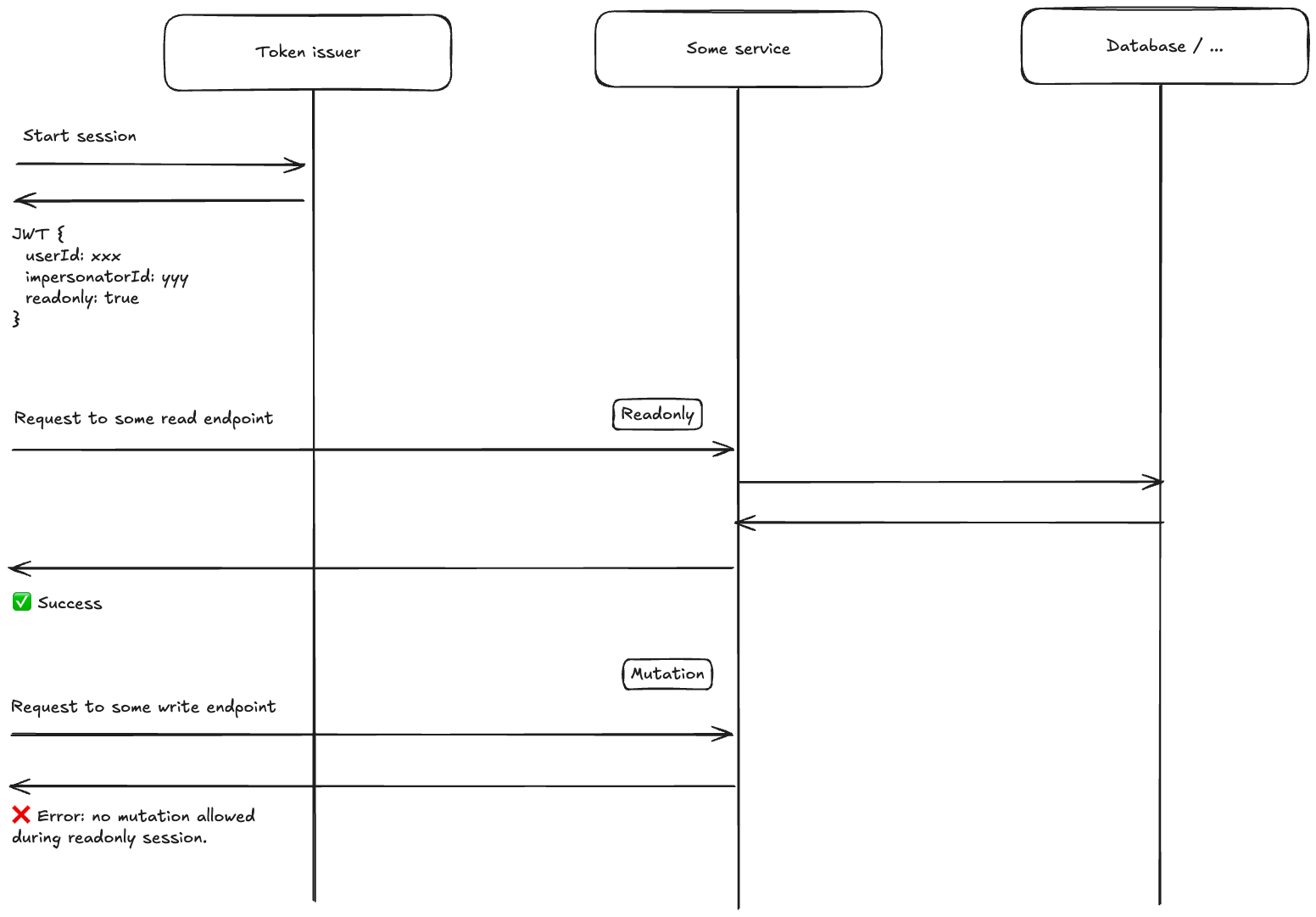
This approach has a key advantage: every backend service sees the impersonated user's identity as the primary identity. We don't need to teach each service about impersonation — they just see a normal user request. The impersonation metadata rides alongside, invisible to services that don't need it, available to those that do (like audit logging).
On the frontend, the impersonation token is stored separately from the admin's regular authentication token. The admin's own session is never lost or overwritten. When impersonation ends — either because the admin stops it or the token expires — the frontend simply reverts to the original token. The transition is seamless: one moment you're seeing the app as the user, the next you're back to your own view.
This separation also means the frontend can display a clear visual indicator during impersonation. The admin always knows they're in an impersonation session, reducing the risk of confusion. It also enables per-tab impersonations: you can work side by side, immediately seeing the result of a configuration change.
Read-only enforcement
The read-only guarantee is the heart of the trust model, so let's dive into how we enforce it.
An important design goal is that the admin sees the app exactly as the user sees it — including edit buttons and action menus. This is the whole point: the admin needs to review what the user can and cannot do. The UI is unchanged during impersonation. But if the admin clicks an edit button, the backend rejects the mutation and the frontend displays a clear message explaining that writes are blocked during impersonation.
The read-only flag lives in the JWT itself — it's not a frontend-only guard. Every API request passes through an authentication middleware that checks this flag. If the request targets a mutating endpoint and the session is read-only, the middleware rejects it with a 403 and a specific response header before it ever reaches any business logic. The frontend recognizes this header and surfaces a user-friendly error.
A key concern for us was maintainability. We introduce new API endpoints every day across many teams, and the question that kept coming up during design was: "How do we make sure this doesn't silently break six months from now?" The read-only enforcement lives in middleware, but the real insurance policy is a custom build-time check that verifies every single endpoint is explicitly tagged as either allowed or denied during read-only sessions. If a developer adds a new endpoint without this annotation, the build fails. (For those familiar with .NET: it's a Roslyn analyzer.)
I'll be honest: when we first discussed writing a custom linter rule for this, there was some debate whether it was worth the effort. But in practice, it has been one of the best investments we made. It forces an explicit decision for every endpoint — no silent defaults that could mask a missed review. Months after the initial implementation, with dozens of new endpoints added by teams that had nothing to do with the impersonation feature, the invariant still holds.
The road not taken: infrastructure-level enforcement
Before settling on endpoint tagging, we seriously explored a fundamentally different approach: enforcing read-only at the infrastructure level rather than the API level. We built a functional proof-of-concept early on, and the idea was appealing in its elegance.
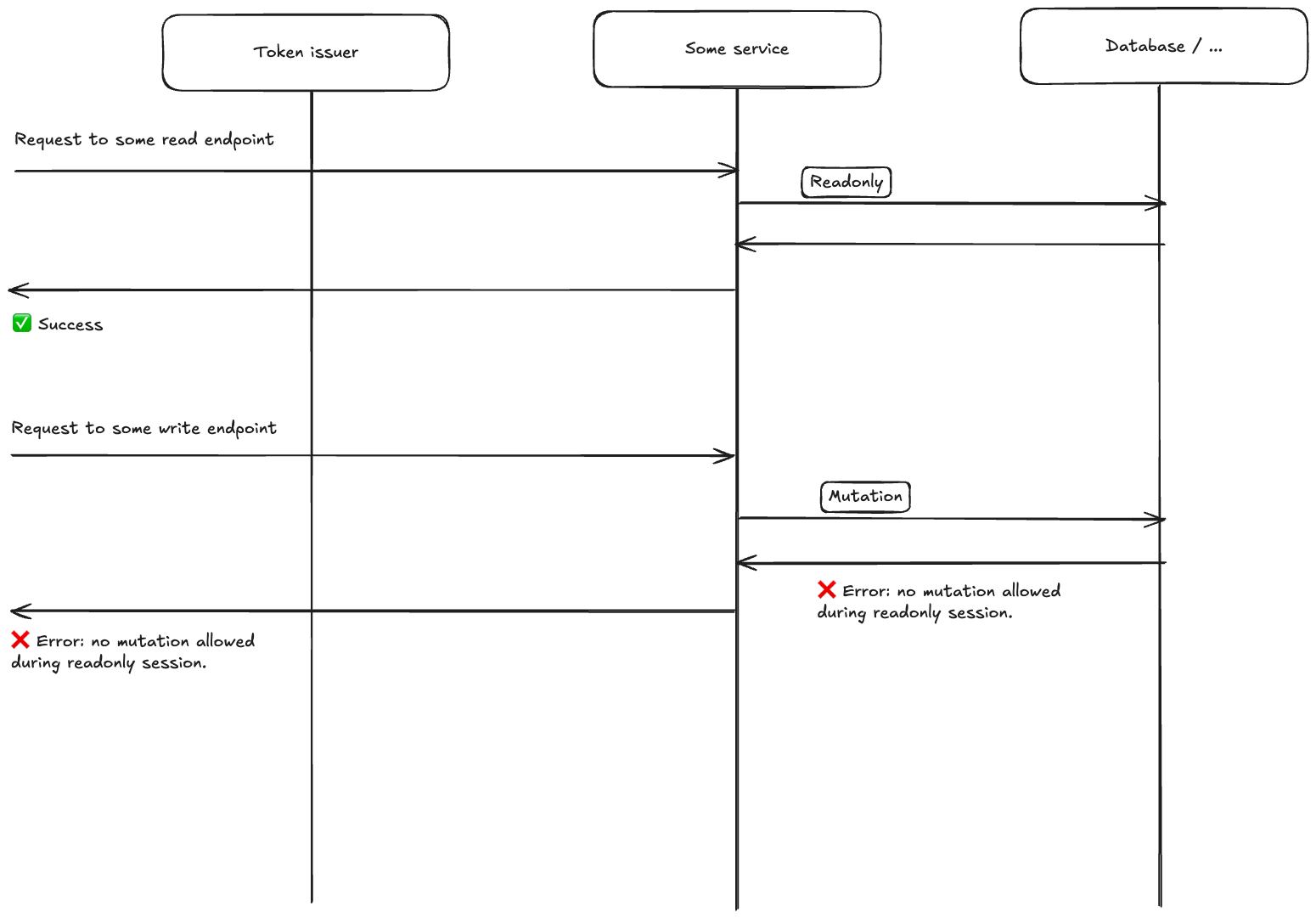
Treat the business logic as a black box. Instead of deciding which endpoints are read-only, intercept all outgoing calls to infrastructure services — Postgres, ElasticSearch, GCP, email, ... — and block writes at that level. For Postgres specifically, the approach is to maintain two separate connection pools against the same database — one with standard read-write connections, one where every connection is opened with SET SESSION CHARACTERISTICS AS TRANSACTION READ ONLY — and route every request in a read-only session exclusively through the latter. If any code path attempts a write through the read-only pool, Postgres itself throws an error with a specific error code. Catch that exception, bubble it up, return a custom header to the frontend.
Why this was tempting: it's truly generic. Business logic becomes a black box. Any new code path that writes to the database is automatically blocked, with zero effort from feature teams. No annotation to remember, no build-time check needed. The approach scales effortlessly as the codebase grows.
Why we discarded it: the real world is messier than theory.
First, context propagation across service boundaries proved complex. Our architecture involves inter-service communication through RabbitMQ and gRPC. Propagating the read-only context through message headers and call metadata added significant plumbing — and every new communication channel would need the same treatment.
Second — and this was the killer — not all writes during a read-only session are illegitimate. Revoking an authentication token writes to the database. Computing statistics when rendering a view updates cache entries. Audit logging itself writes to the database. The infrastructure-level approach can't distinguish between "this write is the user's action" and "this write is a side-effect of reading." Each legitimate write needs an override mechanism, and once you start identifying which writes to allow, you're doing essentially the same work as tagging endpoints — except at a lower level of abstraction with less context about intent.
Third, every infrastructure client needs its own read-only implementation. Postgres has native support for read-only sessions, but not every service does — and whenever we integrate a new one, someone needs to remember to implement read-only enforcement for it. No linter rule can catch a missing infrastructure-level guard the way our build-time check catches a missing endpoint annotation.
What we ended up with is what we initially considered the fallback: endpoint tagging with a build-time linter. It turned out to be more pragmatic — simpler to implement, easier to reason about, and the build-time check addresses the maintainability concern that made infrastructure-level enforcement attractive in the first place.
Audit logging
Every impersonation session start is recorded in the audit log with the impersonated user's identity — their ID, email, and display name. This log is scoped to the organization, meaning the organization's compliance team can review it.
But the audit trail goes deeper than just "session started." Because the impersonator's identity is embedded in the JWT and travels through every service in the request pipeline, any action taken during an impersonation session can be attributed back to the impersonator. If something looks suspicious in the logs, you can always answer the question: "who was actually behind this request?"
This transparency is a feature, not just a compliance checkbox. When customers know that every admin action is tracked and visible, they trust the system more. It turns impersonation from a scary backdoor into a legitimate, accountable support tool.
Making it pleasant to use
Getting the security right is necessary, but not sufficient. If the impersonation experience is clunky, admins won't use it — and you're back to screenshots and screen shares.
We built an impersonation widget in the sidebar that shows who you're currently impersonating and lets you end the session with one click. A subtle dark border frames the entire screen so the admin always knows they're in an impersonation session. And critically, you can switch directly from impersonating one user to another without stopping the session first. When an admin is investigating a permissions issue across multiple users, this makes the workflow fluid rather than tedious.
We also customized the "not found" page during impersonation. If the impersonated user doesn't have access to the page the admin was looking at, instead of a generic "page not found," we show a specific message: "The impersonated Member does not have access to this page." This is valuable information — often it's exactly what the admin was trying to find out. The error page includes a button to stop impersonation and return to the admin's own view.
And a small touch we're proud of: the UI is displayed in the impersonator's locale, not the impersonated user's. You're seeing the user's data and permissions, but the interface still speaks your language.
Beyond user impersonation: support sessions and nesting
So far we've described user impersonation — an admin within a customer's organization reviewing what one of their users sees. But we actually support multiple kinds of impersonation, and they compose.
Support sessions are used by Pigment employees to access a customer's environment for troubleshooting. Unlike user impersonation, support sessions are not necessarily read-only — a support engineer may need to fix configuration issues or run diagnostics. These sessions have their own safeguards: they require multi-factor authentication, they're logged through a separate security pipeline, and they're scoped to specific organizations.
The interesting part is that these two modes nest. A Pigment support engineer can start a support session, and then from within that session, start a user impersonation to see the app as a specific customer user. This is a common workflow: "Customer X reports that User Y can't see their dashboard — let me check."
If you're thinking "nested impersonation sounds terrifying," that's a reasonable reaction. But the safeguards compose as well. The nested session inherits the stricter constraints: user impersonation is always read-only, regardless of whether the outer support session allows writes. The full chain of identities is preserved in the token — the original support engineer, the service account used, and the impersonated user — so the audit trail remains complete. And the organization scoping still applies: the support account must have access to the organization in which the impersonated user is being impersonated.
Crucially, the customer remains in full control: if they don't want Pigment support to impersonate their users, all they have to do is remove the impersonation permission from the support account in their organization. No ticket, no negotiation — it's a standard permission they manage themselves.
What this project taught me
Impersonation is one of those features that's easy to build naively and hard to build safely — and even harder to maintain long-term. If I had to distill it to one insight: get the token architecture right. Separate tokens, embedded constraints, dual identities — the rest follows naturally from there.
But beyond the technical design, this project reminded me why I enjoy working at Pigment. We explored an ambitious infrastructure-level approach — proof-of-concept branches, deep trade-off debates — because it deserved to be explored. And when the evidence pointed toward a simpler solution, we pivoted. That balance between ambition and pragmatism is something I value deeply.
I was also struck by the level of thought our designers put into the experience. The dark border, the inline impersonation switcher, the custom "not found" page, the locale handling — none of these were afterthoughts. They came from designers who cared about getting the details right. The result feels polished, not just safe.
When customers first started asking for this, I had this exciting feeling we could build it safely — but turning that intuition into a production feature took a whole team of talented people, much thought, and many iterations. Seeing it become something our customers genuinely rely on is one of the most rewarding experiences I've had as an engineer.